
Easy Web App Building with AI
History
I've been cranking out apps for my family whenever I have a small need. What was once built using spreadsheets or paper on a fridge is now an app that can track, inform, delight, and provide exactly the experience I hope for without all of the extra work. So far, in the last 6 months, I've built apps to:
Coordinate what to have for dinner
Track how my kids are doing on their personal goals
Track how the kids are doing on earning screen time
Play a word game against my mom every day
Host and write this blog
Keep track of my kids' finances
And I have written so little code that it's funny. That said, I've gone through a number of iterations and I've gotten to a point where the tooling I'm using is meeting my needs well, and the criteria I find valuable are:
Able to be vibe coded easily and iteratively
CI/CD that allows me to test before I commit
Authentication through a safe system
DB that can be owned by Claude
Hosted somewhere I can own
This has led me through a variety of stacks. Bolt.new, repl.it, Firebase, supabase, sql lite, lovable, and lots more. I always want a simple experience like bolt.new, but with Auth and a DB backing it. This is that stack.
The Stack
Github, Vercel, Firebase, and Claude Code or CLI. Let's walk through each part and explain what they do and what the small pitfalls are.
GitHub
If you haven't signed up for GitHub yet, now's the time. Github doesn't differentiate between work accounts and personal accounts, so don't make a new one if you already have one.
Github is a version control system where you can store code that you collaborate on with other people or LLMs.
When you land on the GitHub dashboard, there's a button next to Top Repositories that says New.
Click New and create a new repository for your new project. Give it a name you like, and it doesn't matter if it's public or private. You don't need a template or anything, we'll be building everything with Claude in a minute.
Vercel
Vercel is a CI/CD pipeline as well as a hosting company. Your account is free up to a certain point, so you can try it out and get addicted to the ease of using it. They specialize in next.js and have all of the infrastructure to make the process really easy. They also allow free pointing to domain names as well as multiple projects (though there is a limit for free accounts).
Go to https://vercel.com/new and import your repository. They let you log in with GitHub, which is easy. It should wire up and try to build the repository, which doesn't work yet because it's empty. That's fine.
Claude
There's two paths to getting Claude (or Codex or whatever) to work on your project for you. You can use Claude Code, which is friendly for people who like browsers, or you can use Claude CLI brew install --cask claude-code), which is friendly for people who like the terminal.
Go to https://claude.ai/code and create a new session. At the bottom of the chat box, it says Select a repository. Connect it to your GitHub account and point it at your new repo.
Firebase
Firestore
Your website probably needs specific information for each user, and probably needs a place to store things. Google bought Firebase, a company with the easiest way to connect databases and authenticate users. It remains one of the easiest ways to build databases and authentication.
Go to https://console.firebase.google.com/ and sign up. Create a new project and give it a name.
Once you're in the console, there's a Search for products field at the top left. Search for Firestore. On the landing page, click Create Database. All of the defaults are fine.
Authentication
Search at the top left for Authentication. Click Get Started and choose your sign in provider. I usually use Google because it's super easy, but you can use phone, email, etc. If you're not sure, just pick google and click the Enable switch at the top.
You'll want to give this a good name because this is what people will see when the register on the site. Choose an email people can write to for help and we're done with auth.
Click the tab labeled Settings and go to the Authorized Domains section. Click Add Domain and input vercel.app.
Note: this is technically less secure than setting up your own domain, but it's useful for now.
Settings
Go to Settings -> General in the menu and scroll down to find the Web (</>) icon. Click it and set up a web app. Give it a name and don't worry about hosting. We'll need the code it gives us later, but we can always find it easily.
That's it. We've Started.
The next part is the hard part—you have to know what you want. Here's some tips:
Frameworks:
As my initial prompt, I choose plan mode (⇧⌘P). This allows me to talk to Claude about what I want before it starts building things.
Some of the subtleties that make life easier are choosing frameworks. If you don't know what you want from a technological standpoint, here's some recommendations for what to say if you don't know:
NextJS as the backend
ReactJS as the frontend
Firestore as the database
Firebase Authentication for user login
Hosted on vercel
Daisy UI for the frontend components
I typically break my workflow into three separate prompts:
Prompt 1
I want to build a new website using nextjs and react.
It will be hosted on vercel.
Someone recommended DaisyUI to me for frontend components.
What questions do you need to know to build the initial version of the site?
Save the plan to a plan.md file and we'll iterate from there.
Once I know it's building, I'll move on to the next part.
Prompt 2
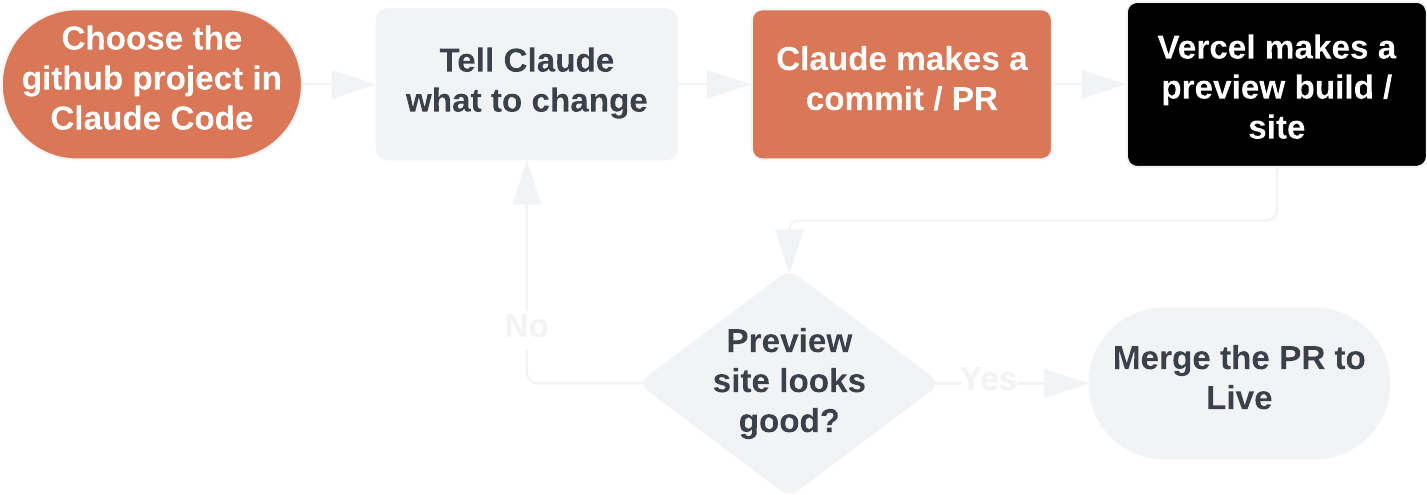
This looks great, let's build it. I'll iterate from there to make sure that the building pipeline works and I can test the project. As Claude makes commits, it'll produce builds on Vercel in the Deployments section.
Prompt 3
I want to add authentication and a database to the project. We'll add a firestore database and firebase authentication via sign in with google.
Make a dashboard page that's only accessible to logged in users.
Add a daisyui button for logging in with google. When you log in, have it take you to the dashboard page.
If someone visits the dashboard page when they're not logged in, redirect them to the homepage.
My firebase config is {
  apiKey: "...",
  authDomain: "...",
  projectId: "...",
  storageBucket: "...",
  messagingSenderId: "...",
  appId: "...",
}
Don't worry about including these variables in the project, they're not sensitive because they're domain-specific.
Eventually the LLM will require you to update your Firestore rules. This is done on the Firebase console under Firestore > Rules. Paste in what Claude gives you and say publish.